

At a glance
NordPass suits solo freelancers wanting a streamlined, zero-knowledge vault with passkey support and cross-device sync, as well as established small teams already operating on Google Workspace. However, micro-teams of two to four people face rigid seat packaging: the entry-level business plan requires purchasing a fixed 10-user pack, while tiers supporting shared team folders impose a five-user minimum, making it awkward for very small operations.
In this guide
Core Security Architecture and Encryption Standards
Developed by the team behind Nord Security, the NordPass password manager departs from the legacy AES-256 encryption standard used by most traditional managers in favor of the XChaCha20 encryption cipher. Within the NordPass zero-knowledge architecture, encryption and decryption occur locally on the user’s client hardware. Master passwords and vault keys are never transmitted to NordPass servers in plaintext, meaning the vendor cannot view, decrypt, or recover stored credentials independently.
Independent validation of this architecture was conducted by the third-party cybersecurity firm Cure53. Their audit evaluated the NordPass cryptographic premise, source code, desktop application codebase, and background application routines. For freelancers and distributed organizations handling client credentials, this independent verification confirms that the client-side cryptographic boundary prevents unauthorized platform-side data exposure.
Hardware authentication and modern login standards are integrated natively into the vault. Users can protect master vault access through biometric unlock mechanisms—including Touch ID, Face ID, and Windows Hello—or via hardware security keys utilizing FIDO2 standards (such as YubiKeys). NordPass also provides native support for passkeys, allowing users to generate, store, and synchronize cryptographic passkey credentials across desktop and mobile devices alongside conventional username-and-password pairs.
Platform Availability and Everyday Vault Management
Credential accessibility across disparate hardware environments is essential for remote workflows. NordPass maintains native applications and extensions across major platforms:
- Operating Systems: Dedicated client applications for Windows, macOS, Linux, Android, and iOS.
- Web Browsers: Official extensions for Google Chrome, Mozilla Firefox, Microsoft Edge, Opera, and Apple Safari.
- Credential Types: Encrypted storage containers for web logins, passkeys, credit card data, secure text notes, and personal identity profiles.
- Productivity Tools: Integrated password generation with custom length rules, password history logs to recover overwritten passwords, and automated browser import utilities for CSV credential sets.
For independent contractors who also secure their network connections with tools like NordVPN for remote work, the familiar administrative ecosystem and cross-platform consistency simplify daily device switching. Autofill prompts populate login fields automatically across desktop browsers and mobile operating systems, minimizing friction when accessing secure client portals.
Understanding NordPass Plans: Personal vs. Business Tracks
NordPass splits its product lineup into two distinct categories: Personal/Family accounts and Corporate Business accounts. Each serves different operational structures and licensing requirements.
Personal and Freelancer Tiers
Individual practitioners generally evaluate three personal formats on the NordPass personal portal:
- Free: Provides zero-knowledge storage and autosave/autofill across devices, but restricts active sessions to a single device at a time, requiring constant switching if you work concurrently across a phone and laptop.
- Premium: Designed for one individual user across unlimited simultaneous devices. It includes multi-device sync, secure file attachments, Password Health auditing, Email Masking, and real-time Data Breach Scanner alerts. Contracts are available on annual or multi-year terms, backed by a 30-day money-back guarantee.
- Family: Packages up to six independent Premium vaults under a single billing account. While intended for households, some micro-collaborators consider this tier to save costs. However, it lacks centralized administrative oversight, shared organizational billing controls, or employee account recovery tools.
Business and Team Tiers
Organizations needing administrative controls must select from three corporate tracks outlined on the NordPass business platform. Subscriptions are billed in USD (excluding applicable VAT) across monthly, one-year, or two-year commitments, with tiered percentage discounts applied to longer agreements:
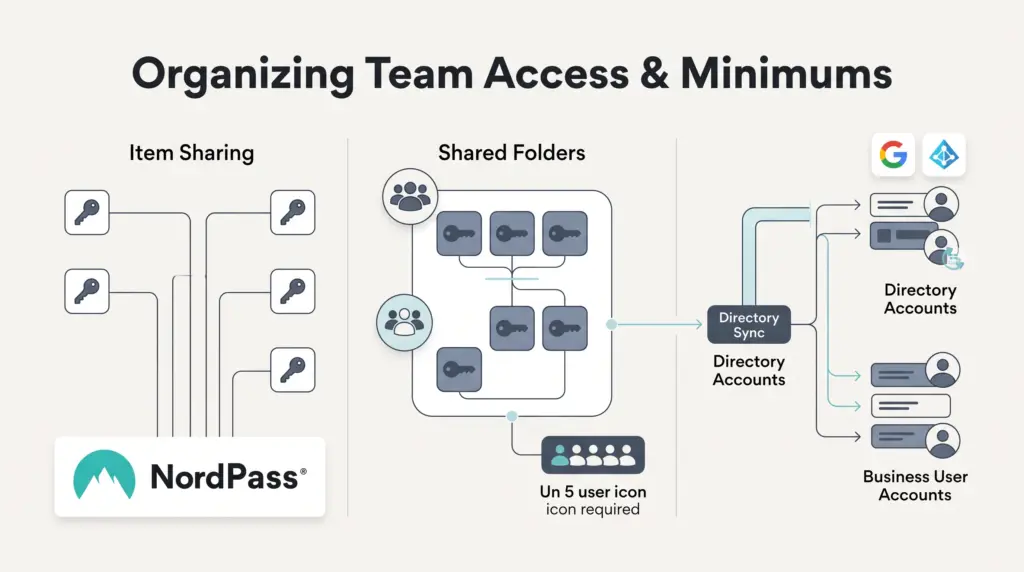
- Teams: Targets small offices but is sold strictly as a fixed 10 users pack only. It includes the Business Admin Panel, basic item-by-item sharing, account recovery, security policy enforcement, offline credential access, activity logs, and single sign-on (SSO) login via Google Workspace.
- Business: Requires a 5 users minimum commitment. It introduces critical team collaboration tools missing from the Teams tier, including Shared Folders, department group management, centralized Password Health monitoring, company-wide Data Breach Scanner reports, and API compliance integration with Vanta.
- Enterprise: Also requires a 5 users minimum. It expands identity management to include advanced SSO (Entra ID, Microsoft ADFS, and Okta), automated user provisioning/deprovisioning via SCIM, centralized sharing tracking via the Enterprise Sharing Hub, an Activity Log API, and security information integration with Splunk and Microsoft Sentinel.
Plan Comparison for Teams
The operational divide between business tiers centers heavily on credential grouping and identity management features. The following table highlights where functional boundaries occur across corporate plans:
| Feature / Capability | Teams Plan | Business Plan | Enterprise Plan |
|---|---|---|---|
| Minimum User Requirement | Fixed 10-user pack only | 5-user minimum | 5-user minimum |
| Google Workspace SSO | Included | Included | Included |
| Enterprise SSO (Okta, Entra ID, ADFS) | Not included | Not included | Included |
| Credential Sharing Method | Item-by-item only | Item-by-item and Shared Folders | Centralized Sharing Hub & Folders |
| Departmental Group Management | Not included | Included | Included |
| Automated SCIM Provisioning | Not included | Not included | Included |
| Company Data Breach Monitoring | Not included | Included | Included |
| SIEM / Compliance Integrations | Not included | Vanta API | Vanta, Splunk, Sentinel, Log API |
Key Packaging Limitations and Trade-Offs
While the underlying encryption and client usability of NordPass are robust, prospective buyers must navigate specific packaging restrictions:
- The Micro-Team Packaging Trap: A team of two, three, or four people cannot purchase a precise three-seat Business license. They must either pay for the five-seat minimum on the Business tier or purchase the fixed 10-user pack on the Teams tier. This packaging structure can make per-user economics inefficient for very small agencies.
- Shared Folders Missing on Entry Business Tier: The Teams plan only supports item-by-item sharing. If an agency wants to organize logins into distinct client or departmental folders with inherited permissions, it is forced to upgrade to the Business plan.
- Identity Provider Constraints: Teams relying on Microsoft Entra ID (formerly Azure AD) or Okta cannot integrate single sign-on or directory synchronization on the Teams or Business tiers. These capabilities are reserved exclusively for the Enterprise tier.
- Separate Infrastructure from VPN Plans: Although developed by the same parent organization, NordPass business licensing is distinct from NordVPN business tiers. Subscriptions must be evaluated and managed independently unless bundled under custom commercial contracts.
Who Each Option Suits Best
Selecting the appropriate NordPass tier depends on team size, compliance obligations, and how credentials are shared daily:
Solo Freelancers and Contractors
Recommended Plan: NordPass Premium (Individual).
Freelancers operating across multiple devices gain seamless biometric login, unlimited multi-device synchronization, and passkey management. The included Email Masking feature helps shield primary inboxes from spam and tracking when signing up for testing tools or client software trials.
Micro-Agencies (2 to 4 People)
Recommended Plan: Business Plan (paying the 5-seat minimum).
Although purchasing five seats for a three-person team carries empty seat overhead, the Teams tier is sold only as a 10-seat bundle and lacks Shared Folders. For an agency juggling dozens of client dashboards, folder-based permission grouping on the Business tier usually justifies the minimum seat cost over manual item-by-item sharing.
Established Small Teams (5 to 25 People)
Recommended Plan: Business Plan.
At five or more seats, seat packaging inefficiencies disappear. Organizations utilizing Google Workspace benefit from consolidated access, domain-level password health oversight, data breach alerts on company credentials, and centralized item transfers when team members depart.
Regulated or Identity-Managed Companies
Recommended Plan: Enterprise Plan.
Organizations standardizing their identity stack on Okta or Microsoft Entra ID require the Enterprise tier for automated user provisioning and single sign-on. This tier also suits organizations requiring automated SIEM reporting via Splunk or Sentinel to satisfy formal security audits.
Next Steps for Deployment
Before purchasing a commercial license, inventory the current credential sprawl across your organization:
- Export and Cleanse Browser Vaults: Consolidate existing passwords saved across disparate Chrome, Safari, and Firefox profiles into CSV files, removing obsolete client accounts prior to import.
- Verify Identity Infrastructure: Determine whether your team relies on Google Workspace or a SAML-based provider like Okta. If directory sync is required, bypass lower tiers and request Enterprise licensing directly from the NordPass feature directory.
- Run a Departmental Trial: Utilize the business free trial to test browser autofill behavior against client login portals that utilize complex iframe authentication or multi-step verification before rolling out company-wide policies.
Sources and further reading
Research checked 2026-09-27. Product details can change.