

At a glance
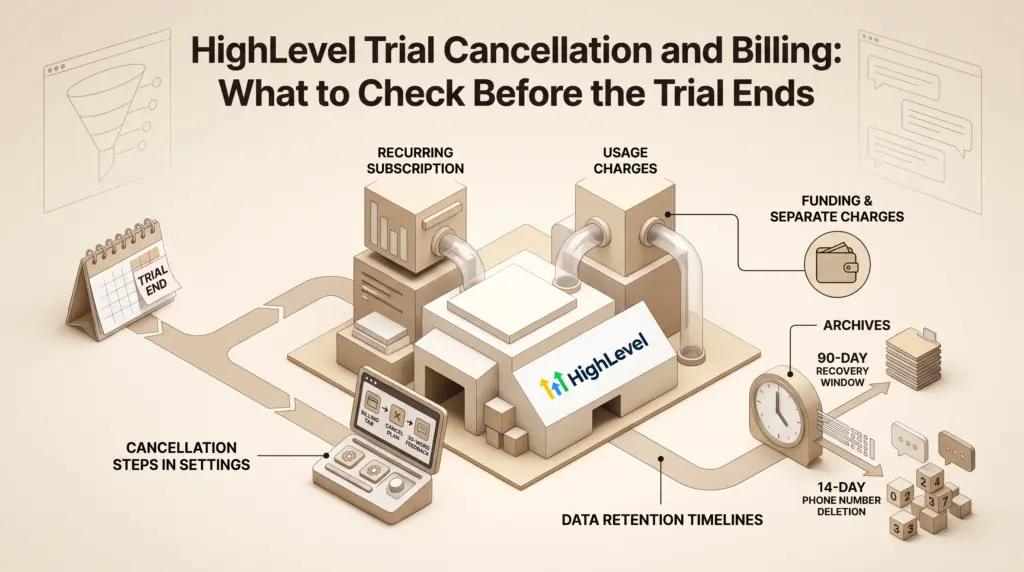
To avoid unwanted charges, complete the cancellation flow in Agency Settings > Billing before your trial period concludes. You must select Want to modify/cancel your subscription?, proceed through the exit questionnaire, and submit at least 30 words of feedback. Remember that phone numbers incur separate charges and are purged after 14 days, while core account data remains recoverable for 90 days.
Evaluating HighLevel gives agencies and freelancers broad access to marketing funnels, unified inboxes, and automated workflows. However, transitioning from an evaluation period—such as the GoHighLevel 30-day free trial—to a paid commitment requires knowing how agency billing operates behind the scenes.
According to HighLevel’s Agency Billing documentation, subscriptions are billed in advance, while usage costs are drawn separately through an Agency Wallet. Knowing the documented cancellation steps and data timelines ensures you are not caught off guard by automatic renewals or lost contact assets.
In this guide
The Documented Cancellation Process
HighLevel does not process cancellations through a simple toggle switch. If you decide the platform is not a fit, you must follow specific documented steps inside your agency dashboard:
- Navigate to Agency Settings and open the Billing tab.
- Click the link labeled Want to modify/cancel your subscription?.
- Click Show More in the pop-up window and select Cancel Plan.
- Choose a reason for your cancellation and click Next.
- Review the platform data loss notice and select I am sure I want to cancel.
- Provide the mandatory written feedback (HighLevel documentation specifies a minimum requirement of 30 words).
- Click Submit to finalize the request.
If you signed up through a third-party agency rather than directly with HighLevel, you cannot cancel through this menu. HighLevel documentation notes that accounts provisioned by an external agency administrator must be changed or canceled directly through that administrator.
Pre-Cancellation Audit: 4 Critical Items to Check
Before initiating cancellation, audit your account to avoid unexpected charges and data loss across active sub-accounts.
1. Phone Numbers and A2P Registrations
Unlike standard platform data, telephony assets operate on a separate schedule. As outlined in HighLevel’s Account Cancellation Data Policy, active phone numbers and A2P messaging registrations are not instantly deleted upon canceling your subscription:
- Phone numbers and carrier brand registrations remain pending deletion for 14 days.
- You continue to be billed for those phone numbers during this 14-day window.
- After 14 days, all associated phone numbers are permanently released and cannot be recovered.
2. Agency Wallet and Usage Charges
HighLevel bills recurring subscription plans and communication usage through different mechanisms. Your recurring plan covers core software access, while SMS, outbound calling, email, and workflow AI charges pull from your Agency Wallet. Pre-funded wallet balances cannot be transferred to cover recurring subscription invoices.
3. Data Retention and Export Requirements
Once canceled, your agency account and all sub-accounts immediately lose access to contacts, conversation threads, calendars, and marketing funnels. Automations immediately cease running. HighLevel retains core account data for 90 days post-cancellation, during which you can reactivate to restore operations. After 90 days, data is purged permanently with no administrative backups. Before canceling, manually export:
- Contact lists, custom fields, and conversation histories.
- Funnels, websites, and email templates.
- Invoicing records, transaction histories, and customer order logs.
4. Associated Add-ons and Marketplace Apps
When an agency subscription is canceled, any connected add-on services or reselling subscriptions are canceled automatically. If you have active third-party services that require independent commitments (such as Online Listing services that carry an explicit 3-month commitment), manage those independently through HighLevel Support chat prior to leaving.
Cancellation vs. Pause Plan vs. Downgrade
Depending on your immediate business goals, a complete cancellation may not be the only operational path available in Agency Settings > Billing.
| Option | Billing Impact | Data & Asset Status | Best Suited For |
|---|---|---|---|
| Complete Cancellation | $0/month ongoing; usage stops immediately. | Access cut immediately. Numbers deleted after 14 days; general data purged after 90 days. | Teams permanently migrating to another software platform. |
| Pause Plan | $27/month. | Account remains on hold; core configuration and data are preserved beyond the 90-day purge window. | Freelancers taking a seasonal break who want to keep assets intact. |
| Plan Downgrade | Adjusts down to lower tier (e.g., Starter). | Sub-accounts and access adjust based on lower-tier parameters; phone numbers stay active. | Teams needing basic CRM tools without unlimited sub-accounts. |
For a detailed breakdown of core tiers and ongoing costs, explore our guide to HighLevel pricing plans and add-ons.
Documented Financial Assistance Alternative
For agencies facing temporary cash constraints who wish to stay on the platform, HighLevel provides an in-app financial relief request option within Agency Settings > Billing > Want to Modify/Cancel Your Subscription?. Approved accounts receive one month of platform access at 10% of their standard plan cost. HighLevel terms document this discount as a one-time relief mechanism requiring explicit written justification.
Pre-Cancellation Checklist
To ensure a clean departure without residual charges, work through these sequential checks before the final day of your trial:
- Export all CRM assets: Download contact lists and transaction logs from every sub-account.
- Review phone numbers: Decide whether to release numbers manually or let them incur charges across the 14-day deletion window.
- Check third-party commitments: Submit cancellation tickets for specialized add-ons with separate term commitments.
- Complete the exit survey: Ensure your cancellation justification contains the required 30-word minimum to unlock the submit button.
- Confirm receipt: Look for the automated confirmation email sent to your registered agency email address.
Frequently Asked Questions
Can I pause my HighLevel trial instead of canceling?
HighLevel provides a Pause Account feature priced at $27 per month, which keeps your configuration and assets secure without running active client sub-accounts. Standard trial accounts that do not select the pause option must either cancel or roll into standard billing.
What happens if my payment details fail on the renewal date?
According to HighLevel billing documentation, if an agency subscription payment fails, account access remains active during a 21-day dunning window. If payment is not completed within 21 days, access is locked. Automatic background payment retry attempts continue for up to 30 days from the initial failed invoice date.
Are agency wallet credits refunded upon trial cancellation?
No, recurring subscription billings and Agency Wallet funds are handled separately. HighLevel documentation states that wallet credits cannot be used toward subscription fees. Any refund inquiries regarding wallet balances must be formally submitted to HighLevel Billing for individual account review.
How do I switch an agency plan from yearly back to monthly?
While upgrading between monthly and annual terms can be done self-service in the billing dashboard, switching an active annual subscription back to monthly billing cannot be completed directly in the interface. You must contact HighLevel Support via chat or ticket to adjust the billing cadence.
Sources and further reading
Research checked 2026-10-30. Product details can change.