

At a glance
HighLevel manages sales leads and deals through customizable opportunity pipelines inside each sub-account. You track opportunities across custom stages using Kanban or list views, and reporting updates automatically. Won and Lost statuses are built in automatically, stages can be color-coded for visual clarity, and all pipeline features are included across all plan tiers without per-user or contact caps.
In CRM platforms, sales pipeline management determines how cleanly team members follow prospects from cold inquiry to signed agreement. Within HighLevel, pipelines organize and track these deals—referred to in the platform as opportunities—giving freelancers, marketing agencies, and internal sales teams a shared visual workflow. Because HighLevel plans include unlimited contacts and unlimited users, teams can scale deal tracking without paying per-seat software fees.
In this guide
How HighLevel Pipelines and Opportunities Work
In HighLevel, deal tracking operates at the sub-account level. A single sub-account can host multiple distinct pipelines to represent different service offerings, outreach channels, or customer journeys. For example, a consulting firm might maintain one pipeline for inbound discovery calls and a separate pipeline for onboarding closed clients.
Key elements of the pipeline architecture include:
- Pipelines: High-level customer journeys that contain a sequential series of sales steps. Each pipeline must have a unique name within its sub-account.
- Stages: Individual phases of a deal (such as “Lead Captured,” “Call Booked,” or “Proposal Sent”). HighLevel automatically provisions “Won” and “Lost” stages for every pipeline, eliminating the need to add final outcome columns manually.
- Opportunities: Individual deal cards representing a lead or customer, storing deal value, contact details, assigned owner, and status.
- Reporting Visibility: Each stage contains settings to toggle its inclusion in dashboard widgets, including funnel charts and pie charts.
Documented Setup: Creating Pipelines and Stages
Pipelines are managed directly within the sub-account administration area. According to HighLevel documentation, setting up a new pipeline follows a specific administrative path:
- Accessing the Tool: Navigate to your specific sub-account, select Opportunities from the left sidebar, and click Pipelines in the top navigation bar.
- Creating the Pipeline: Click the Create new pipeline button, supply a descriptive, unique pipeline name, and save.
- Adding Stages: Enter a unique stage name and click Add stage to build out the deal sequence. Stages can be reordered at any time using up and down arrows.
- Customizing Stage Colors: Open the Stages tab to apply visual markers. Stages can display default styling, a colored dot, or a full background tint. These color preferences automatically carry over to Kanban boards, list views, opportunity cards, and contact detail panels.
- Configuring Reporting Controls: Click the funnel and pie chart icons next to individual stages to choose whether opportunities in that stage display in dashboard metrics.
Opportunity Tracking and Data Protection
HighLevel displays active deals through visual Kanban boards and tabular list views. Team members can drag and drop opportunity cards between stages as sales conversations advance, or trigger automatic stage shifts using HighLevel workflow automations when prospects book meetings or complete forms.
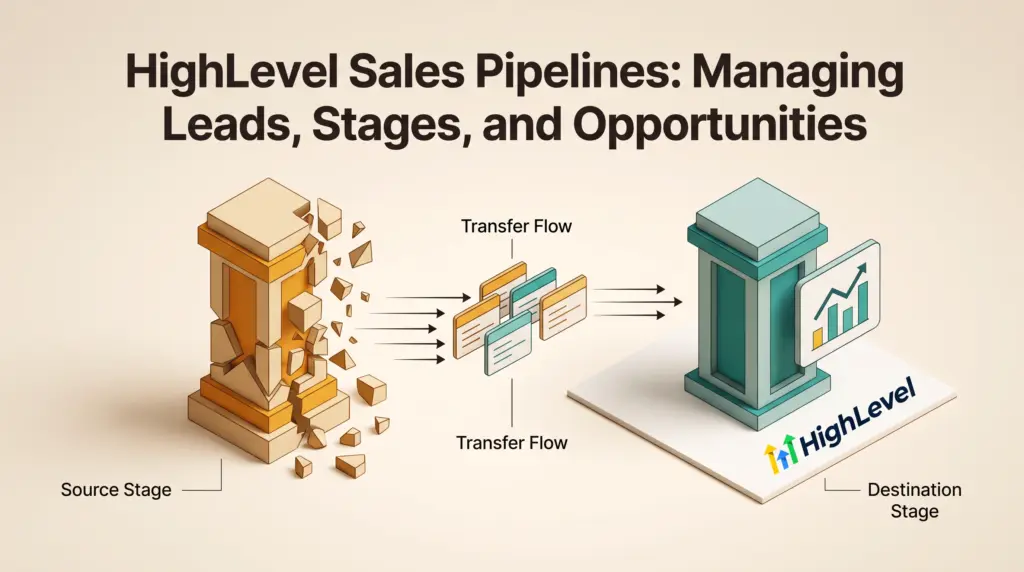
A critical operational safeguard exists when modifying workflows: if an administrator removes an existing pipeline stage, HighLevel requires the user to select a destination stage before confirming deletion. All active opportunities currently sitting in the deleted stage automatically transfer to the selected destination stage, preventing orphaned records or accidental loss of pipeline revenue data.
Actionable Setup Checklist vs. Hypothetical Sales Flow
To help distinguish documented platform mechanics from business-specific sales choices, the following checklist outlines required system steps alongside a hypothetical consulting deal flow.
| Workflow Phase | HighLevel Platform Mechanism (Provider Fact) | Hypothetical Implementation Example (Assumption) |
|---|---|---|
| 1. Lead Entry | Opportunities are created manually or generated via form/calendar trigger. | A web inquiry creates an opportunity in the “New Inquiry” stage with a $2,500 target deal size. |
| 2. Qualification | Stages display custom visual tints and dot markers across Kanban views. | Opportunities move to “Discovery Call Booked” (marked in blue) after scheduling via booking calendars. |
| 3. Proposal Review | Reporting toggles control whether the stage reflects in funnel charts. | Prospect reaches “Proposal Out” (marked in yellow), included in pipeline conversion reporting. |
| 4. Deal Closure | Won and Lost states are automatically system-managed without custom stages. | Lead accepts proposal, moving the card to the built-in “Won” status to record closed revenue. |
| 5. Stage Cleanup | Stage deletion requires selecting a transfer stage before removal. | Deleting an unused “Follow-Up 2” stage safely migrates five stale leads back to “Qualified Lead.” |
Pricing and Plan Availability
According to HighLevel pricing, CRM & Pipelines are classified as core platform features. This means pipeline functionality is fully accessible on all standard subscription plans:
- Agency Starter ($97/month or $970/year): Includes CRM and pipelines, unlimited contacts, and unlimited team users across up to 3 sub-accounts.
- Agency Unlimited ($297/month or $2970/year): Adds unlimited sub-accounts and phone/email rebilling capabilities, making it suitable for agencies managing client pipelines across multiple isolated workspaces.
- Founder ($497/month or $4970/year): Includes full platform features alongside advanced rebilling with markup and priority partner network resources.
Eligible teams evaluating the platform can review the current promotion: Try GoHighLevel free for 30 days with access to the live bootcamp. Payment details are required at signup, and standard subscription billing starts after 30 days unless canceled. Telecom and AI usage charges are separate from core subscription costs.
Documented Platform Limitations
While HighLevel provides robust deal management, specific documented constraints must be considered during configuration:
- Pipeline Name Uniqueness: Pipeline names must be completely unique within an individual sub-account. You cannot duplicate names even if one pipeline is inactive.
- Stage Name Uniqueness: Every stage inside a single pipeline must have a unique label. You cannot create multiple stages with the same display name in one pipeline.
- Cross-Account Pipeline Sharing: Pipelines live inside specific sub-accounts. Copying pipelines or templates between client accounts requires using sub-account duplication or platform snapshot tools.
- Usage-Based Communications: Automated SMS and voice calls triggered from pipeline stage changes consume telecommunications credits outside the flat software fee.
Who Each Pipeline Setup Suits
Freelancers and Solo Consultants: The Starter tier ($97/month) provides ample capacity. Managing your sales stages inside one sub-account lets you track inbound inquiries, schedule discovery sessions, and measure closing rates without paying per-seat fees common in traditional CRMs.
Growing Agencies and Multi-Brand Operators: The Unlimited tier ($297/month) allows you to spin up separate pipelines for your agency sales while provisioning dedicated sub-accounts with custom pipelines for every client you serve.
Next Steps
To start organizing your sales deals in HighLevel, navigate to your sub-account dashboard, open Opportunities > Pipelines, and map out your typical client stages. Ensure you set your funnel reporting toggles before launching active campaigns so conversion metrics reflect accurately in your executive dashboard.
Sources and further reading
Research checked 2026-10-31. Product details can change.