

At a glance
GetResponse Starter allows only one custom automation workflow and restricts segmentation to basic profile data and campaign actions, without tagging or scoring. The Marketer plan unlocks unlimited automation workflows, event-based triggers, abandoned cart tracking, and behavioral segmentation based on tags, purchase activity, and website visits for $59 per month (or $48.38 per month on an annual contract).
Choosing between the Starter and Marketer tiers on GetResponse primarily comes down to how your business segments subscribers and routes them through automated sequences. While both plans provide unlimited email sends, the difference in behavioral logic, trigger availability, and contact tracking creates a distinct functional divide.
In this guide
Automation Limits: One Workflow vs. Unlimited Workflows
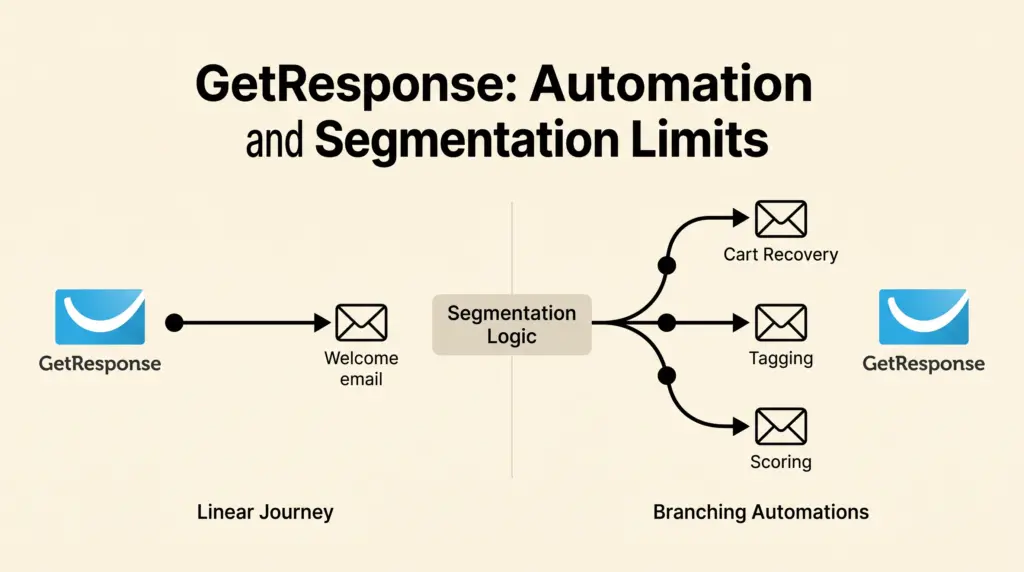
The headline operational difference lies in workflow capacity. On the Starter plan (priced at $19 per month billed monthly, or $15.58 per month billed annually), you receive standard autoresponder series and welcome emails, but you can only publish 1 custom automation workflow.
This single-workflow cap means a freelancer or team must choose one dedicated path—such as a single re-engagement campaign or a single lead-nurturing split. In contrast, the Marketer plan (priced at $59 per month billed monthly, or $48.38 per month billed annually) permits unlimited automation workflows, allowing simultaneous onboarding paths, multi-product funnels, and retention branches.
For an overall perspective on tier structures, read our overview of GetResponse pricing and billing plans.
Trigger and Action Capabilities Compared
Workflow quantity is not the only constraint. The visual builder itself is significantly restricted on the Starter tier due to missing triggers and actions:
- Contact Tagging and Scoring: Starter cannot assign tags or lead scores to contacts. Marketer introduces both contact tagging and contact scoring, enabling points-based qualification and custom categorization.
- Website Behavior: Visited URL automation is absent on Starter. Marketer allows you to trigger automated emails or assign tags when a subscriber visits a specific URL on your tracked site.
- Ecommerce Triggers: Starter does not support purchase automation, order confirmation flows, or abandoned cart triggers. Marketer provides native abandoned cart recovery and purchase-triggered actions. For more on retail funnels, see our guide on GetResponse ecommerce automation.
- Event-Based Logic: Custom event tracking and split automation driven by event data require the Marketer tier.
- Web Push Notifications: Starter excludes web push, whereas Marketer includes unlimited web push notifications and web push automation.
Segmentation Rules and Filter Limits
Audience segmentation in email marketing depends on the criteria available to build dynamic contact lists. The Starter plan includes foundational filters, while the Marketer plan introduces behavioral layers.
Segmentation on the Starter Plan
On Starter, you can segment audiences using:
- Standard contact details (name, email address, custom field values).
- Contact geolocation data.
- Consent fields gathered at opt-in.
- Basic campaign actions (message opens and link clicks).
Starter does not allow you to filter contacts based on tags, engagement scores, funnel progression, or ecommerce purchasing history.
Advanced Segmentation on the Marketer Plan
The Marketer tier adds dynamic segmentation rules that draw from full lifecycle engagement:
- Tags and Scores: Create groups based on active tags or threshold engagement scores.
- Ecommerce Actions: Filter customers by purchase history, order value, and abandoned cart status.
- Funnel and Lead Magnet Steps: Filter subscribers by their position within conversion funnels or specific lead magnet downloads.
- Event Data: Segment contacts according to external events pushed into GetResponse.
Feature Comparison: Starter vs. Marketer
| Feature | Starter Plan | Marketer Plan |
|---|---|---|
| Monthly Price (Month-to-Month) | $19 | $59 |
| Monthly Price (Annual Billing) | $15.58 | $48.38 |
| Monthly Email Sends | Unlimited | Unlimited |
| Custom Automation Workflows | 1 workflow | Unlimited |
| Autoresponders | Included | Included |
| Contact Tagging & Scoring | Not included | Included |
| Visited URL Automation | Not included | Included |
| Abandoned Cart Recovery | Not included | Included |
| Segmentation by Tags & Scores | Not included | Included |
| Ecommerce & Funnel Segmentation | Not included | Included |
| Team User Seats | 3 users | 5 users |
| A/B Testing & Send Time Tools | Not included | Included (A/B testing, Perfect Timing, Time Travel) |
Documented Limitations to Keep in Mind
Before choosing either tier, note these documented boundaries:
- AI Content Limits: On the Starter plan, the AI email generator and AI subject line generator are restricted to 3 uses total, whereas Marketer offers regular access.
- User Seat Ceilings: Starter supports up to 3 team users without role management. Marketer includes 5 users and adds custom role permissions.
- Webinars and Courses: Neither Starter nor Marketer includes course-creation tools, website builders, or webinars; those features begin on the Creator tier ($69/mo monthly, $56.58/mo annual).
- Taxes: Published rates reflect net pricing; applicable local sales taxes or VAT are added at checkout based on region.
Decision Framework: Which Tier Fits Your Workflows?
When the Starter Plan Is Sufficient
The Starter tier suits solo operators and simple setups with direct messaging needs:
- You distribute regular newsletter broadcasts and linear, date-based drip sequences.
- Your email marketing relies on basic sign-up form triggers rather than site-wide tracking.
- You do not require behavioral tagging, interest scoring, or multi-step cart recovery.
- A single automated workflow (such as a welcome survey routing contacts into two lists) satisfies your technical scope.
When You Need to Upgrade to Marketer
The Marketer tier is necessary if your marketing operations rely on responsive logic:
- You run an ecommerce storefront needing abandoned cart reminders and purchase-based follow-ups.
- You run multiple simultaneous lead generation funnels requiring individual nurture paths.
- You use tag-based segmentation to track subscriber interests across multiple campaigns.
- You need optimization utilities like email A/B testing, Perfect Timing delivery, and page visit triggers.
Actionable Next Steps
- Audit your existing automation maps: Count how many active automated journeys you require. If your strategy demands more than one workflow or relies on tags to pause sequences, budget for the Marketer tier.
- Check your data triggers: Verify whether your sign-up processes require URL tracking or purchase events. If so, configure them against Marketer’s event-based triggers.
- Calculate contract costs: Review your contact list size against the base tier pricing ($19/mo Starter vs. $59/mo Marketer) and determine whether the 18% annual billing discount fits your team’s software budget.
Sources and further reading
Research checked 2026-11-03. Product details can change.