

At a glance
NordVPN fits remote freelancers and agile teams needing automated fail-safes and selective routing. The Kill Switch ensures unencrypted traffic never leaks during sudden disconnections, while Split Tunneling lets bandwidth-heavy local services bypass encryption. This combination suits contractors managing sensitive client portals alongside local hardware, though platform support and tier limits require upfront planning.
In this guide
Why Kill Switch and Split Tunneling Matter for Remote Work
Remote contractors and small teams often juggle unsecured public networks, sensitive client dashboards, and local office hardware simultaneously. Standard VPN usage routes all machine traffic through an encrypted tunnel. However, two common friction points emerge: sudden tunnel drops that expose unprotected data, and local peripheral lockouts caused by total traffic redirection.
NordVPN addresses these operational hazards with two primary network management controls:
- Kill Switch: A continuous monitoring safeguard designed to shield user data if your VPN connection drops unexpectedly, severing internet access or specific app connections before unencrypted packets reach the wider internet.
- Split Tunneling: A traffic segmentation rule set allowing users to define which applications require VPN protection and which trusted apps route through the standard, unencrypted local internet.
For independent professionals handling proprietary databases or financial dashboards, an unshielded disconnection can lead to compliance violations or session termination. Pairing the Kill Switch with selective tunnel rules lets you isolate sensitive remote work while preserving access to local area network devices.
How the NordVPN Kill Switch Operates
The primary role of the Kill Switch is prevention. When an encrypted tunnel closes due to network hiccups, server switches, or intermittent Wi-Fi, operating systems naturally fall back to the unencrypted ISP gateway. Without a fail-safe, background software—such as cloud sync utilities or email clients—will transmit credentials in the clear.
NordVPN implements this defense by monitoring the handshake status between your local device and the remote VPN server. If that encrypted link breaks unexpectedly, the software alters routing rules to restrict network access until the secure tunnel re-establishes. This ensures your true IP address and sensitive payload data remain invisible to local eavesdroppers on public networks.
When combined with options like a NordVPN Dedicated IP or specialized configurations such as NordVPN Double VPN, the Kill Switch acts as the foundational layer ensuring IP masking and encryption integrity never lapse silently during transit.
Configuring Split Tunneling: Performance vs. Coverage
Routing every single packet through an encrypted VPN tunnel is not always ideal for day-to-day business tasks. Heavy video conferencing, continuous local file backups, and local wireless printers can suffer from latency penalties or IP mismatches when routed through a remote VPN server.
Split tunneling provides granular traffic segregation. Remote operators typically deploy it across two main strategies:
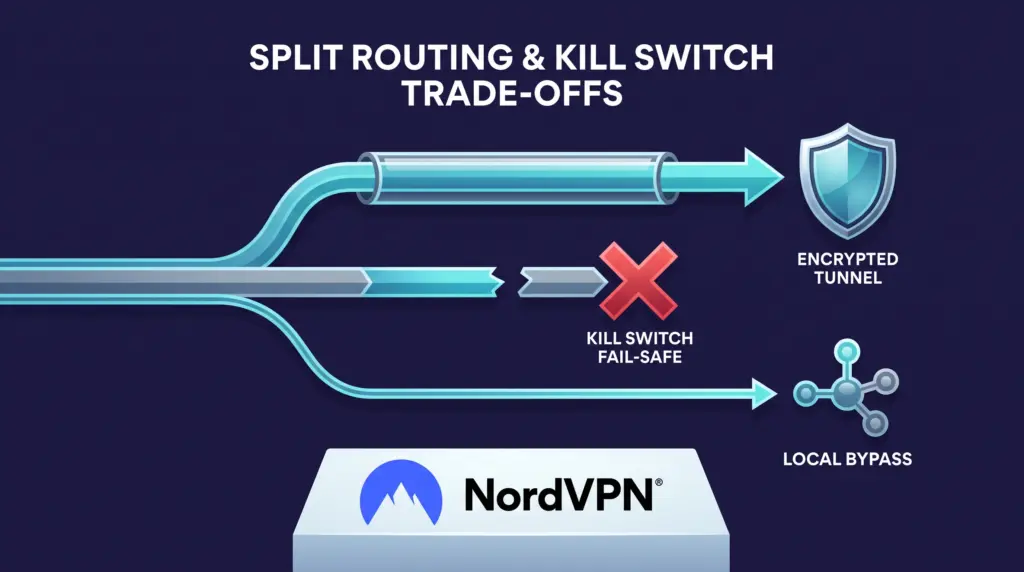
- Inverse Split Tunneling (Protect Selected): Directs normal web browsing, video calls, and local network traffic through your standard local ISP connection, while specifically forcing sensitive apps (such as FTP clients, database managers, or specific web browsers used for client administration) through the encrypted NordVPN tunnel.
- Standard Bypass (Exclude Selected): Keeps the entire device encrypted under NordVPN by default, but explicitly excludes high-bandwidth or latency-critical applications (such as low-risk video rendering or local backup syncs) from the VPN tunnel.
While split tunneling prevents network congestion and eliminates regional access blocks on everyday tools, it does create an asymmetric security model. Applications configured to bypass the VPN do not benefit from the encrypted tunnel or the Kill Switch safeguard.
NordVPN Plans, Pricing, and Business Scalability
All consumer NordVPN tiers include core VPN connectivity, the Kill Switch, and split tunneling capabilities, covering up to 10 devices simultaneously per account. Independent freelancers can select an introductory subscription based on their broader digital storage and monitoring needs, while growing teams must evaluate device ceiling constraints.
| Plan Tier | Introductory 2-Year Rate | Introductory 1-Year Rate | Key Bundled Add-ons |
|---|---|---|---|
| Basic | $3.49/month ($94.23 for first 27 months) | $5.49/month ($65.88 for first 12 months) | Core VPN, Kill Switch, Split Tunneling, 10 devices, Scam & phishing protection, Dark Web Monitor (5 emails) |
| Complete | $4.49/month ($121.23 for first 27 months) | $6.49/month ($77.88 for first 12 months) | All Basic features, plus 1 TB encrypted cloud storage, password manager, desktop anti-malware, Dark Web Monitor Pro |
| Prime | $7.49/month ($202.23 for first 27 months) | $9.49/month ($113.88 for first 12 months) | All Complete features, plus credit freeze assistance, identity theft insurance, cyber extortion insurance (US) |
All pricing is sourced in USD from the NordVPN Pricing Page (checked October 2026). Introductory multi-year commitments offer substantial upfront discounts but renew at standard rates, and optional add-ons like Dedicated IP addresses can be appended at checkout. Purchases are backed by a 30-day money-back guarantee.
For small operations, note that a 10-device limit applies to simultaneous connections across gadgets owned by a single account holder. A consumer device allowance does not represent a multi-user corporate license. Businesses requiring centralized user provisioning, single sign-on, or gateway administration should explore enterprise-tailored platforms such as NordLayer rather than sharing consumer logins.
Feature Limitations and Remote Work Friction
While the Kill Switch and Split Tunneling solve major workflow hurdles, certain technical and policy trade-offs exist:
- Operating System Inconsistencies: Split tunneling availability varies by operating system. While widely supported on platforms like Windows and Android, OS-level architecture limits on macOS or iOS can restrict application-level routing. Always verify platform support for your specific operating system release.
- Bypass Vulnerabilities: Any software application excluded from the VPN via split tunneling transmits data in the open. If an excluded application handles unencrypted client credentials over public Wi-Fi, the VPN cannot intervene.
- Network Interruption Overhead: A strict system-wide Kill Switch will abruptly drop ongoing downloads, video streams, or background syncs whenever the VPN connection re-negotiates. While vital for security, it can cause transient communication pauses.
- Device Cap Bottlenecks: Small teams attempting to pool one 10-device consumer plan across multiple laptops, tablets, and test phones will hit simultaneous connection walls rapidly without warning.
Who Each Setup Suits
Solo Freelancers and Consultants
Solo professionals handling sensitive client files benefit most from keeping the Kill Switch active at all times on laptops. Pairing this with split tunneling allows everyday communications or local network printers to operate smoothly without dropping the secured channel required for client work. The Basic Plan covers up to 10 devices, providing sufficient headroom for a workstation, travel laptop, tablet, and mobile device.
Multi-Device Creators
Freelancers handling substantial digital assets benefit from the Complete Plan, which supplements core network protections with 1 TB of secure cloud storage and a cross-platform password manager. Split tunneling becomes essential here to bypass heavy video render uploads through local broadband while keeping administrative sessions shielded.
Growing Remote Agencies
Teams expanding past a couple of operators should be cautious. Consumer plans lack multi-user identity management, activity audits, or dedicated administrative roles. While tools like NordVPN Meshnet allow private peer device connections, organizations managing multiple employees should evaluate dedicated corporate VPN architecture rather than managing consumer subscriptions.
Next Steps
To implement this setup securely in your remote workflow:
- Determine whether your client contracts enforce strict data leak policies that necessitate an active Kill Switch at all times.
- Verify that split tunneling is compatible with your primary desktop operating system before committing to an annual billing plan.
- Audit the applications on your remote machines: identify low-risk, high-bandwidth tools for bypass routing, and designate sensitive portals to stay inside the encrypted tunnel.
- Review the plan structures on the NordVPN website to choose between the standalone VPN tier and bundles including cloud storage, keeping the 30-day money-back guarantee in mind for onboarding testing.
Sources and further reading
Research checked 2026-10-13. Product details can change.