

At a glance
The GetResponse Enterprise plan suits high-volume businesses and security-conscious teams that require dedicated deliverability control, SAML single sign-on, transactional SMTP infrastructure, and custom governance. For solo operators and small teams with contact lists under 100,000, standard self-serve tiers like Starter, Marketer, or Creator provide identical core marketing automation tools at transparent monthly or annual prices without custom procurement overhead.
In this guide
Dedicated IP and Sending Infrastructure: Reputation Control
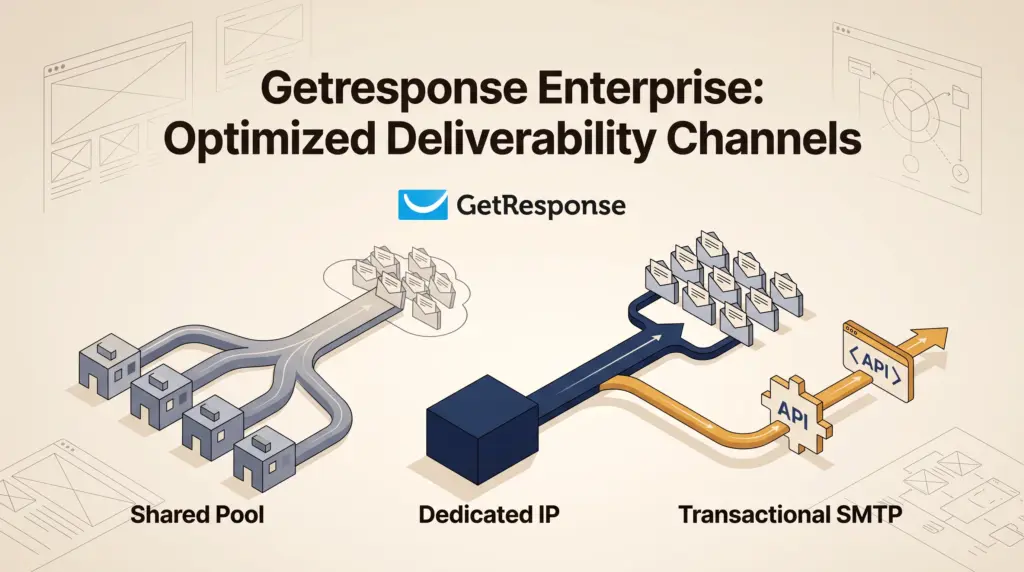
Deliverability on standard email platforms relies on shared IP pools, where hundreds of unrelated accounts distribute email traffic through common network addresses. If one sender engages in poor list hygiene or aggressive sending practices, other senders sharing that IP address can suffer degraded inbox placement.
The GetResponse Enterprise plan resolves this by providing an optional dedicated IP address alongside a dedicated sending domain. A dedicated IP isolates your sending reputation entirely: your domain and IP reputation reflect only your team’s subscriber management, authentication records, and engagement rates. To prevent immediate deliverability failures caused by sudden sending spikes, the Enterprise tier includes assisted IP warmup, where GetResponse deliverability experts stage volume increments gradually.
However, a dedicated IP is not universally superior for small operations. Maintaining positive sender reputation on a dedicated address requires consistent, predictable send volume. Freelancers and small teams sending irregular newsletters or fewer than 50,000 to 100,000 messages per month often find shared pools more forgiving, as low or erratic volume on a dedicated IP can prevent internet service providers (ISPs) from establishing reliable reputation data.
Security and Access Governance: SSO and Unlimited Seats
For growing organizations handling client data or sensitive marketing assets, user management becomes an operational bottleneck on standard tiers. As documented in our guide to GetResponse pricing choices, the Starter tier allows only 3 users, while the Marketer and Creator tiers cap team access at 5 users.
The Enterprise plan removes user caps entirely, offering unlimited user seats alongside customized roles management. This allows organizations to define granular permissions, ensuring copywriters, analysts, and external agency partners access only the campaigns and reports relevant to their duties.
Crucially, Enterprise introduces Single Sign-On (SSO). SSO enables identity management teams to route GetResponse access through centralized corporate identity providers (such as Okta, Azure AD, or Google Workspace). This provides key administrative controls:
- Centralized Provisioning: Instantly revoke account access when an employee or contractor leaves the organization without manually changing shared credentials.
- Enforced Security Policies: Apply corporate-wide multi-factor authentication (MFA) and password hygiene standards to your marketing platform.
- Audit Logging: Simplify access tracking for compliance reviews and internal security audits.
Transactional Email Capabilities: SMTP and API Architecture
Standard GetResponse tiers focus almost exclusively on marketing automation, scheduled broadcasts, autoresponders, and funnel workflows (as broken down in our comparison of GetResponse Starter vs. Marketer). However, product-led companies and e-commerce stores require reliable delivery for system-critical notifications, including password resets, purchase receipts, account notifications, and order updates.
The Enterprise tier includes dedicated transactional email functionality, enabling developers to connect core web applications directly to GetResponse via:
- SMTP Connection: Route server-generated messages through established mail transfer protocols without rewriting web app communication layers.
- Transactional REST API: Programmatically dispatch triggered emails based on custom app events and backend logic.
- Performance Analytics and History: Monitor real-time delivery logs, bounce diagnostics, and open tracking specific to transactional traffic, separate from marketing newsletter statistics.
Separating transactional delivery infrastructure from broadcast marketing guarantees that high-volume promotional sends do not delay urgent transactional receipts or password resets.
Comparing Standard Tiers to GetResponse Enterprise
Understanding the architectural divide between self-serve tiers and Enterprise helps teams avoid premature custom contracts. The following table contrasts core operational capabilities across tiers, referencing baseline features outlined on the GetResponse pricing page:
| Capability | Starter ($15.58/mo billed annually) | Marketer ($48.38/mo billed annually) | Creator ($56.58/mo billed annually) | Enterprise (Custom Pricing) |
|---|---|---|---|---|
| Seat Limit | 3 users | 5 users | 5 users | Unlimited with role management |
| IP Infrastructure | Shared IP pool | Shared IP pool | Shared IP pool | Dedicated IP (with assisted warmup) |
| Single Sign-On (SSO) | Not available | Not available | Not available | Included |
| Transactional Email | Not available | Not available | Not available | API & SMTP connection included |
| Webinar Capacity | Not available | Not available | Up to 100 attendees | Up to 1,000 attendees |
| Contract Lengths | Monthly or 12 months | Monthly or 12 months | Monthly or 12 months | Monthly, 12, or 24 months |
| Dedicated Support | Email & standard chat | Email & standard chat | Email & standard chat | Dedicated Customer Experience Manager, Slack & phone |
Enterprise Limitations and Operational Realities
While the Enterprise plan delivers expansive enterprise infrastructure, it introduces distinct constraints for lean teams:
- Opaque Pricing and Sales Cycles: Unlike standard plans that publish list-size tiers transparently (from 1,000 to 100,000 contacts), Enterprise requires scheduling a sales demo and negotiating a custom proposal based on send volume and support tiers.
- Contract Commitments: Standard plans offer rolling monthly or discounted 12-month prepay terms. Enterprise accounts involve formal contract negotiations with options extending to 24-month commitments.
- Maintenance Responsibility for Dedicated IPs: Adopting a dedicated IP removes the buffer of a shared pool. If your team sends erratic promotional bursts followed by weeks of silence, your delivery metrics may suffer without disciplined sending schedules.
- Overlapping Tools: Features like 5,000 free SMS credits, mobile push notifications, and AI product recommendations are bundled into Enterprise, which can inflate total cost if your team only requires SSO or transactional delivery.
Who Each Option Suits
Choose Standard Plans (Starter, Marketer, or Creator) if:
- You are a solo business owner, small consultancy, or lean agency with five or fewer team members requiring platform access.
- Your email volume fluctuates widely from week to week, making a shared IP pool safer and more cost-effective.
- You rely on third-party transactional providers (such as Postmark or SendGrid) for application receipts and only need GetResponse for newsletters, course delivery, or landing pages (as explored in our review of the GetResponse Creator plan).
Choose GetResponse Enterprise if:
- Your company enforces strict IT governance requiring SAML SSO and granular role-based permissions across marketing staff.
- You send high, predictable monthly email volumes (typically hundreds of thousands of messages) and require total ownership over your sender reputation via a dedicated IP and sending domain.
- You want to consolidate marketing automation, SMS marketing, webinars, and transactional application emails under a single vendor contract backed by a dedicated Customer Experience Manager and Slack support.
Next Steps and Evaluation Strategy
Before initiating enterprise procurement, audit your actual monthly send volume, technical integration requirements, and security policies. If your primary need is advanced automation, abandoned cart funnels, or webinar marketing, upgrading to Marketer or Creator on a standard 12-month discount provides substantial capability without contractual complexity.
If your organization determines that a dedicated IP, SSO, or transactional SMTP are mandatory, do not sign a contract immediately. Request access to the 30-day GetResponse Enterprise Pilot Program during your initial sales demo. The Pilot Program allows your technical team to test platform features, evaluate API performance, and assess strategic support before locking into a long-term agreement.
Sources and further reading
Research checked 2026-10-08. Product details can change.