

At a glance
Stay on Make Free while its credit allowance, active-scenario limit and scheduling interval meet your needs. Upgrade to Core when one of those limits blocks a useful workflow. A low number of incoming records does not necessarily mean low credit usage: estimate every action and include polling, retries and variable-credit features where applicable.
In this guide
A small workflow can still need a paid plan
Consider a hypothetical workflow that processes 400 records each month and performs three one-credit actions for each record. Those actions alone would need 1,200 credits. That exceeds the Free plan’s documented 1,000 monthly credits before allowing for any other billable work.
Conversely, 100 records with three such actions need 300 credits before those extras. A workflow at that volume may still need an upgrade for a different limit. Make the decision from both the expected usage and the required features, rather than the number of apps connected.
This is an arithmetic example, not a guarantee of a scenario’s actual credit use. Check the official credit explanation and our Make plan and billing comparison for the quoted prices and allowances.
Choosing between the Free and Core tiers on Make is one of the earliest architectural decisions a freelancer or small operations team faces. While both plans grant access to the visual drag-and-drop builder and thousands of application connectors, the structural boundaries between them determine whether your automations run reliably in a production environment or repeatedly stall against platform caps.
Understanding these operational thresholds ensures you only upgrade when your business workflows genuinely outgrow the platform’s entry-level constraints. For a deeper breakdown of credit mechanics across all tiers, review our guide to Make pricing and credit usage.
Make Free vs Core: Core Specifications
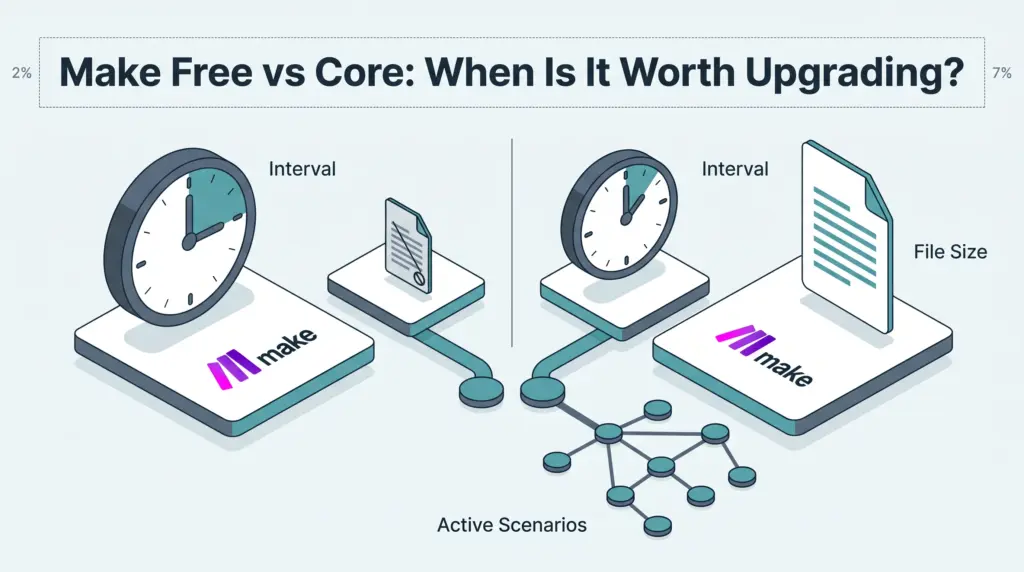
The gap between the entry-level tier and Core is defined primarily by concurrency, scheduling intervals, and processing limits rather than restricted access to app integrations.
| Platform Capability | Make Free | Make Core |
|---|---|---|
| Active Scenarios | 2 | Unlimited |
| Minimum Scheduling Interval | 15 minutes | 1 minute |
| Maximum Execution Time | 5 minutes | 40 minutes |
| Maximum File Size | 5 MB | 100 MB |
| Data Transfer Limit | 512 MB | 5 GB (scales proportionally per 10k credits) |
| Execution Log Retention | 7 days | 30 days |
| Make API Rate Limits | Not included | 60 calls/minute |
| Annual Credit Rollover | No (monthly reset) | Not included in the current comparison |
| Customer Support | 90-day onboarding guidance | Standard technical support |
To inspect current regional subscription costs for Core across monthly and annual commitments, verify details directly on the Make pricing page.
The Two-Scenario Ceiling
The most immediate constraint on the Free plan is the hard cap of two active scenarios. In practice, an active scenario is any automation switched on to listen for webhooks, poll an inbox, or execute on a schedule. Once you establish a routine workflow—such as capturing inbound form inquiries into a CRM and forwarding notifications to a chat channel—your free allotment is exhausted.
On Make Core, the active scenario limit becomes unlimited. This shift fundamentally changes how you architect automations. Instead of cramming multiple business processes into monolithic workflows laden with branching logic, you can modularize your operations into focused, maintainable scenarios. You can also deploy subscenarios to chain complex processes together without sacrificing an active slot.
Scheduling Frequency: 15 Minutes vs. 1 Minute
Latency is another critical dividing line. The Free plan enforces a minimum execution interval of 15 minutes for scheduled triggers. If an automation relies on polling an external service—such as checking for new rows in a spreadsheet, scanning an email inbox, or monitoring an e-commerce feed—the workflow will only run four times per hour.
For low-priority administrative tasks like daily data backups or end-of-week reporting, a 15-minute delay is inconsequential. However, for time-sensitive operations such as lead routing, order confirmation, or client alert dispatching, a quarter-hour delay can degrade customer experience. Core lowers the minimum scheduling interval to 1 minute, enabling near-real-time synchronization across connected platforms.
Processing Capacity, File Sizes, and Timeouts
Workflows that process rich media, batch data, or custom code quickly exceed the physical execution boundaries of the Free plan:
- File processing ceilings: Free restricts file processing to 5 MB per item, which accommodates standard CSVs and plain documents but fails when handling high-resolution imagery, audio files, or PDF contracts. Core expands this ceiling to 100 MB, allowing robust file management and transformation. For complete technical parameters, see our overview of Make execution limits, data transfers, and file caps.
- Execution timeout windows: A single scenario run on the Free tier terminates if it exceeds 5 minutes. Large record collections can reach this time limit. The Make Code App is not included on Free; do not assume a paid code feature is available before comparing runtime limits. Core extends the maximum single-execution window to 40 minutes.
- Bandwidth thresholds: The Free plan caps total monthly data transfer at 512 MB. Core provides a base allocation of 5 GB, which scales proportionally with your monthly credit volume.
Observability and Debugging Windows
Troubleshooting intermittent automation failures requires access to execution logs. The Free plan retains execution logs for 7 days. If a workflow fails over a weekend or during a busy period, the debugging data may expire before a freelancer has time to inspect the error payload.
Core retains execution logs for 30 days. The current pricing comparison lists Make API access as unavailable on Free and limited to 60 calls per minute on Core.
Does Core include annual credit flexibility?
The current comparison marks yearly credit flexibility as unavailable on Free and Core. Do not assume paying annually gives Core the same credit pooling offered on higher tiers.
Limitations Shared by Both Free and Core
While Core resolves capacity and concurrency hurdles, it remains an entry-level commercial tier that lacks several advanced features reserved for higher plans:
- Credit exhaustion: Check extra-credit purchasing options before relying on uninterrupted execution. The pricing page lists overage protection under Enterprise.
- Standard priority queueing: Scenarios on Core run at standard priority; they do not receive the expedited execution queueing assigned to Pro or Enterprise subscriptions.
- Limited team governance: While both tiers permit unlimited platform users and private spaces for scenario authoring, neither Free nor Core includes custom organization roles or advanced audit logging.
If your team requires self-hosted environments or dedicated execution control without credit caps, you may also want to compare these constraints in our analysis of Make vs n8n.
Which Plan Suits Your Workflow?
Stay on Make Free if:
- You manage no more than two active automations simultaneously.
- Your processes tolerate a 15-minute polling interval without impacting service delivery.
- Your workflows handle lightweight payloads, plain text, and files smaller than 5 MB.
- You are prototyping concepts or learning the visual builder before committing to operational expenses.
Upgrade to Make Core if:
- You need three or more scenarios running continuously in the background.
- Your business logic requires 1-minute scheduling for rapid response times.
- You automate media, multi-page PDFs, or batch files between 5 MB and 100 MB.
- Your scenarios include complex iterations or custom code that exceed the 5-minute timeout.
- You require 30 days of log history to maintain client delivery standards.
Next Steps for Evaluating Make
To determine whether an upgrade is immediately justified, map out your current scenario inventory. Calculate whether your existing workflows can be consolidated into two master scenarios, or whether separating them into modular subscenarios offers better stability. Monitor your average file sizes and check whether your scheduled triggers require minute-by-minute execution. If any single threshold creates an operational bottleneck, moving to Core provides the headroom needed for dependable business automations.
Sources and further reading
Credit-budget example added 29 October 2026. The existing detailed tier limits below retain the earlier research date and should be checked against the current pricing selector.
Research checked 2026-09-23. Product details can change.