

At a glance
The Make Enterprise plan suits scaling organizations, technical agencies, and operations teams running business-critical workflows that demand strict identity governance, expanded file handling, and elevated execution queues. Freelancers and early-stage small businesses generally achieve sufficient throughput with lower tiers, but teams needing custom role delegation, audit logging, SAML single sign-on, or on-premise network access require the contractual governance and expanded infrastructure of Enterprise.
In this guide
When Does Scaling Require Make Enterprise?
For most individual operators and boutique agencies, Make’s self-serve tiers handle everyday workflow orchestration effectively. Tiers like Pro and Teams manage dozens of concurrent processes across popular third-party software. However, scaling automation across an entire company introduces operational friction that self-serve configurations cannot solve: unpredictable execution latency during platform traffic surges, restrictive payload boundaries, and insufficient oversight over internal user credentials.
The Make Enterprise plan restructures platform resources around predictability and governance. Rather than competing in standard multi-tenant queues, workflows on Enterprise receive high-priority execution to minimize scheduling delays. When integrated with advanced error mitigation strategies like those covered in our guide to Make error handling and recovery, high-priority scenario execution ensures that time-sensitive business pipelines—such as real-time inventory adjustments or automated transaction routing—complete reliably without waiting behind standard background jobs.
Execution Boundaries: Enterprise vs. Standard Tiers
Operational bottlenecks often stem from data volume rather than step volume. While entry-level and intermediate tiers impose payload caps that complicate media-heavy or bulk-record workflows, Enterprise expands execution ceilings across multiple dimensions.
- File Size Capacity: While the Free plan caps files at 5 MB and the Teams plan accommodates up to 500 MB, Enterprise doubles the ceiling to 1,000 MB per file, permitting automations to process high-resolution creative assets, database exports, and compressed system archives directly on the canvas.
- Execution Log Retention: Standard paid tiers retain execution logs for 30 days. Enterprise extends this historical visibility to 60 days, giving system administrators twice the window to investigate past runs, troubleshoot data discrepancies, and conduct compliance reviews using full-text execution log search.
- Queue Priority: While the Teams plan introduces priority scenario execution over baseline tiers, Enterprise implements high-priority queue allocation to safeguard processing time during platform-wide utilization spikes.
- Scenario Duration: Like other paid tiers, scenario run times are capped at 40 minutes per individual execution (compared to 5 minutes on the Free plan), accommodating deep looping structures, paginated API retrievals, and data warehousing routines.
Teams combining these execution parameters with local persistence mechanisms like Make Data Stores gain an environment capable of staging and auditing complex transactional pipelines without requiring external caching layers.
Governance, Access Oversight, and Private Spaces
As automation adoption decentralizes across marketing, sales, and engineering departments, administrative visibility becomes paramount. Uncontrolled workflow authoring can expose sensitive API keys or trigger unapproved credit consumption.
Make Enterprise introduces granular organizational guardrails designed to maintain administrative control without paralyzing builder autonomy:
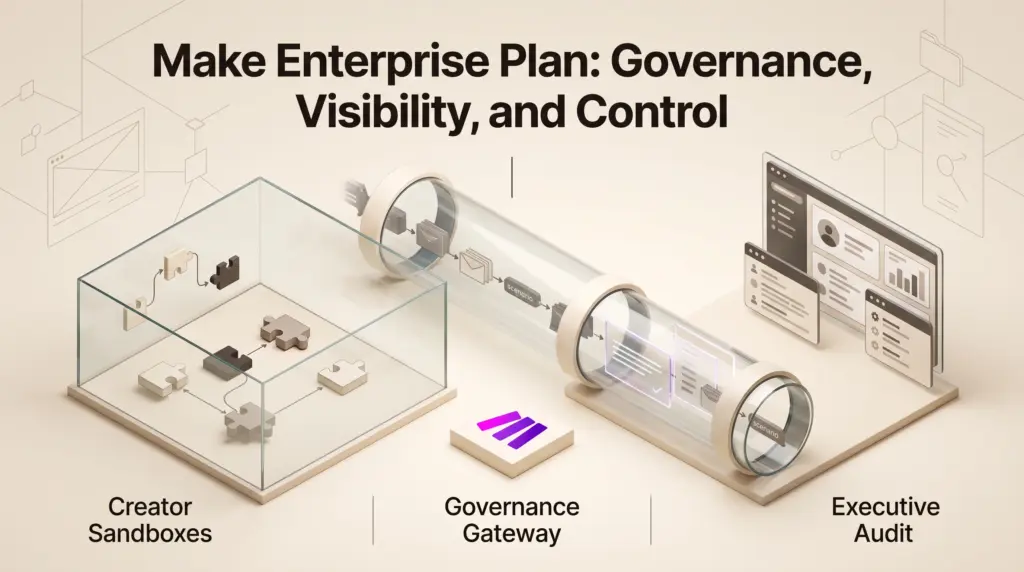
- Private Spaces with Admin Oversight: While individual users can build workflows within their own private sandboxes on all tiers, the Enterprise tier grants designated administrators read-only visibility into those private spaces. Administrators can inspect scenario names, examine which connector modules are employed, and track credit burn without tampering with the creator’s unfinished design.
- Custom Roles and Scoped Permissions: Standard tiers limit teams to predefined permission sets. Enterprise allows organizations to define custom roles at both the company and team levels, restricting which users can publish live scenarios, modify shared connections, or access specific system templates.
- System and Audit Logs: Security teams receive exhaustive logging of user interactions, authentication timestamps, and administrative modifications to verify operational compliance.
- Credits Overage Protection: Workflows stay operational even when an unexpected traffic surge consumes the allocated credit pool, preventing mission-critical data pipelines from pausing mid-cycle.
Enterprise Security and Hybrid Infrastructure
For organizations operating under compliance frameworks or managing connections to private corporate intranets, standard cloud webhooks present technical and legal hurdles. Enterprise bridges public cloud tools and secured networks through dedicated connectivity options.
On-Premise Agents and Enterprise Connectors
Standard Make scenarios communicate across public API endpoints hosted in AWS regions across Europe or North America. For enterprise architectures that cannot expose internal systems to public internet routing, Make Enterprise provides an on-premise agent. This agent bridges cloud orchestrations to localized internal infrastructure, enabling secure, credentialed access to legacy enterprise systems, localized database clusters, and platforms such as SAP without compromising boundary firewalls.
Identity Federation and Domain Verification
While two-factor authentication (2FA) is available across all tiers, Enterprise allows administrators to mandate 2FA across the entire organization. Additionally, companies can implement Single Sign-On (SSO) via SAML 2.0 or OAuth 2.0 identity providers such as Okta, Azure Active Directory, or Google Workspace. Through domain claiming, companies enforce SSO requirements for any user registering an account under their corporate email domain, preventing unsanctioned personal accounts from interacting with company data assets.
Plan Comparison: Standard vs. Enterprise Capabilities
To evaluate whether an upgrade is commercially justified, examine the direct operational differences between Make’s collaborative self-serve tiers and the Enterprise deployment tier.
| Capability | Pro Plan | Teams Plan | Enterprise Plan |
|---|---|---|---|
| Scenario Execution Priority | Standard | Priority | High Priority |
| Maximum File Size | 250 MB | 500 MB | 1,000 MB |
| Execution Log History | 30 days | 30 days | 60 days |
| Admin View of Private Spaces | Not available | Not available | Read-only scenario & credit view |
| Team & Organization Roles | Predefined | Predefined team roles | Custom role creation |
| SSO & Domain Claiming | Not available | Not available | Included (SAML 2.0 / OAuth 2.0) |
| Hybrid Network Access | Not available | Not available | On-premise agent enabled |
| Customer Support Level | Technical support | High-priority consultants | 24/7 senior specialists & Value Engineering |
For an in-depth breakdown of how lower collaboration tiers handle user seats and concurrency, consult our comparison of Make Pro vs. Teams plans.
Limitations and Trade-offs
Despite its architectural breadth, Make Enterprise is not a universal necessity, and adopting it brings specific trade-offs:
- Procurement and Contractual Overhead: Unlike self-serve tiers billed on predictable monthly credit thresholds via standard credit card transactions, Enterprise requires custom sales quoting, formal vendor onboarding, and structured annual contracts.
- Run Time and Memory Realities: The maximum duration for a single execution remains capped at 40 minutes, identical to the standard paid plans. Extremely intensive data transformations or unindexed nested loops still require modularization into subscenarios or offloading to dedicated processing microservices.
- Internal Administrative Demands: Custom permissions, SSO configuration, and domain claiming require ongoing administrative overhead. Organizations without dedicated IT or operations staff will find these governance layers add unnecessary complexity.
Who Should Choose Make Enterprise?
Choose Make Enterprise if:
- You manage cross-functional teams building automations across sensitive customer datasets that mandate corporate SAML/OAuth SSO and domain claiming.
- Your pipelines routinely ingest large data assets between 500 MB and 1,000 MB that fail under lower-tier payload ceilings.
- You must query legacy or internal corporate networks behind local firewalls via on-premise agents.
- Your IT compliance policies demand 60 days of historical execution logs, administrative audit trails, and 24/7 dedicated specialist support.
Stick with Teams or Pro if:
- You are a solo freelancer or agile agency building standard software integrations that exchange lightweight JSON payloads under 250–500 MB.
- Your team coordinates effectively using standard role assignments without needing custom organizational permissions or domain lockdown.
- Your infrastructure communicates strictly through public cloud SaaS APIs without requiring on-premise bridges.
Next Steps and Implementation Path
If your organization is approaching data capacity ceilings or encountering compliance reviews, map out your usage before initiating an enterprise sales consultation. Quantify your peak monthly credit consumption, document the size of your largest file payloads, and catalog any on-premise endpoints that currently require manual workarounds. Request a trial sandbox or proof-of-concept from the Make sales team to evaluate SSO identity mapping, audit log exports, and on-premise agent responsiveness within your staging environment prior to signing an annual commitment.
Sources and further reading
Research checked 2026-10-11. Product details can change.