

At a glance
Make error handling suits freelancers and small teams running business-critical integrations who cannot afford silent pipeline breaks or wasted credits. By configuring dedicated error handler routes, managing webhook queues, and structuring retry logic, teams ensure intermittent API outages or unexpected data payloads do not halt entire operations or require manual data re-entry.
In this guide
Why Scenario Failures Matter for Lean Teams
In automated operations, failures are inevitable. Third-party APIs experience downtime, services enforce unexpected rate limits, and incoming data structures shift without warning. When a module encounters an unhandled exception in Make, the platform’s default response depends directly on how the scenario is configured.
For freelancers and small teams, unhandled errors lead to two major operational headaches: broken workflows that go unnoticed until clients complain, or scenarios that enter an error state and pause execution entirely. Understanding how Make handles errors, retries, and data queues helps you build resilient pipelines while protecting your monthly operations allowance.
How Make Treats Failures: Scheduled vs. Instant Scenarios
The execution model of your scenario fundamentally dictates what happens when a run fails. Make distinguishes sharply between instant triggers and scheduled triggers when an error is encountered.
- Instant (Webhook) Triggers: When a scenario is set to execute immediately upon receiving a webhook, an unhandled error causes the scenario run to stop immediately.
- Scheduled Triggers: When a scenario runs on a schedule (including scheduled webhook processing), Make allows up to three unsuccessful attempts before the scenario deactivates automatically to prevent runaway execution costs.
If you build workflows around webhooks versus polling, this distinction is critical. A scheduled batch job will retry up to three times across subsequent cycles before shutting down, whereas an instant webhook scenario stops processing that specific run right away.
Error Directives and Flow Control
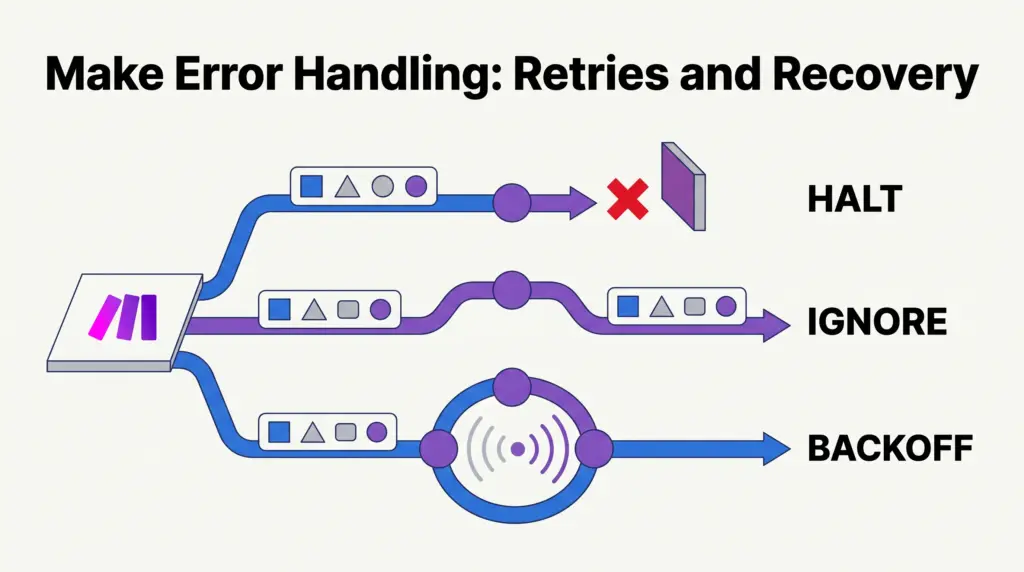
Make provides specific error-handling directives that you can attach directly to any module’s error handler route. Rather than letting an exception crash the scenario, you route the failed bundle into an alternative path using one of several specialized actions:
1. Resume
The Resume directive allows you to provide a substitute output bundle and let the scenario continue along its primary path. This is useful when a non-essential lookup fails (such as fetching optional customer metadata) and you can supply a sensible fallback value.
2. Ignore
The Ignore directive instructs Make to drop the error completely and proceed as if the module returned nothing. This suits scenarios where missing data or a failed notification should simply be skipped without interrupting downstream updates.
3. Commit
Commit forces the scenario execution to save its current progress up to the failing module and stop cleanly. Intermediate changes remain committed rather than rolled back.
4. Rollback
Rollback immediately halts the execution and attempts to revert operations performed during that scenario run, preventing partial updates from leaving external apps in an inconsistent state.
5. Break and Exponential Backoff
When an error occurs due to temporary service unavailability or rate limiting, the Break directive stores the execution in the incomplete executions queue. It then attempts to re-execute the module using exponential backoff—waiting increasingly longer intervals between retry attempts until the external service recovers or the retry cap is reached.
Webhook Queues, Responses, and Backpressure
When dealing with high-volume integrations, incoming data management is just as important as module-level logic. According to Make’s webhook documentation, the platform implements strict limits to prevent memory overflow and server saturation.
Queue Size and Credit Limits
Incoming webhook calls that cannot be processed instantly enter a dedicated queue. Make sizes this queue dynamically based on your account’s subscription: you receive up to 667 queued items for every 10,000 credits licensed per month, capped at a platform maximum of 10,000 items per webhook. If that limit is exceeded, Make returns an HTTP 400 error status with the body Queue is full.
Rate Limiting
Make can ingest up to 300 incoming webhook requests per 10-second interval per webhook. Any traffic exceeding this threshold triggers an HTTP 429 status code (Too many requests).
The Placement of Webhook Responses
If your scenario uses custom Webhook Response modules, where you place that module inside the scenario canvas creates a distinct operational trade-off:
- Placed Mid-Scenario: If you place the Webhook Response module near the beginning or middle of your scenario, the calling service immediately receives a success confirmation (such as HTTP 200). However, if a subsequent module fails downstream, Make will not deactivate the scenario. This can result in silent failures and increased consumption of operations without sending an alert.
- Placed at the End: Placing the Webhook Response module as the final step guarantees that the calling application only receives confirmation after all steps finish successfully. If any module fails beforehand, the scenario alerts you according to your notification settings.
Execution Architecture: Error Behavior Compared
| Handling Mechanism | Primary Behavior | Best Suited For | Trade-Off to Consider |
|---|---|---|---|
| Resume Directive | Supplies fallback values and continues downstream flow. | Non-critical fields or optional data enrichment. | May mask recurring data inconsistencies from source systems. |
| Ignore Directive | Discards the error and skips subsequent processing for that bundle. | Optional notifications or ancillary data logging. | No record of the dropped bundle unless logged elsewhere. |
| Break Directive | Sends execution to incomplete queue with exponential backoff. | Temporary API outages, connection drops, and 429 rate limits. | Holds execution state; requires credit balance to retry. |
| Rollback Directive | Stops scenario immediately and halts processing. | Strict transactional data (e.g., finance and invoicing). | Halts entire scenario; unprocessed data requires manual intervention. |
System Limitations to Keep in Mind
While Make offers granular error tools, lean teams should plan around several architectural constraints:
- Webhook Log Retention: Make retains standard webhook logs for 3 days. Only organizations on the Enterprise tier retain logs for 30 days. Teams debugging intermittent failures must review webhook history promptly before logs expire.
- Inactive Webhooks: Webhooks not connected to any active scenario for more than 5 days (120 hours) are automatically deactivated by Make and return an HTTP 410 Gone status.
- Queue Caps on Lower Plans: Because webhook queue depth is pegged at 667 items per 10,000 monthly credits, teams on smaller operational plans have smaller buffers against sudden data spikes before incoming requests get rejected. You can review plan allocations in our breakdown of Make pricing and operations.
- Execution Caps: Modules executed on error handler routes count toward your total scenario operations. Complex retry loops can exhaust monthly caps faster than expected, as detailed in our guide on Make execution limits.
Who Each Strategy Suits
Choosing an error-handling approach depends on the criticality of your workflow:
- Freelancers with Simple Syncs: The Ignore or Resume directives provide enough resilience for portfolio forms, lead capture alerts, or social media scheduling where an occasional missing field should not pause the workflow.
- Agencies Handling Client Records: Using the Break directive alongside structured branching with routers and filters ensures CRM entries and customer updates are not lost during third-party API downtime.
- E-commerce and Financial Pipelines: Workflows that process orders, payments, or invoices should rely on Rollback directives or terminal Webhook Responses, prioritizing strict data accuracy over silent completion.
Next Steps
To audit your error posture in Make, start with these actions:
- Review your high-impact scenarios and verify whether instant webhooks are set to parallel execution or Process data in order, depending on sequence requirements.
- Inspect the Webhooks tab in your Make dashboard to check queue depths and examine any logs nearing the 3-day retention limit.
- Attach Break directives to external API modules that experience occasional rate limits, ensuring failed items land in Incomplete Executions for controlled retry attempts.
- Confirm that Webhook Response modules are positioned at the end of critical scenarios so downstream errors notify your team instead of silently swallowing failures.
Sources and further reading
Research checked 2026-09-26. Product details can change.