

At a glance
Short Answer: Make Data Stores suit freelancers and small teams needing simple, low-maintenance record persistence inside their workflow automation platform. They work best for caching API IDs, deduplicating runs, and tracking scenario execution states without provisioning external databases. However, complex relational querying, high-volume operational analytics, and cross-organization sharing require a dedicated external datastore instead.
In this guide
What Are Make Data Stores?
When running automated workflows, scenarios execute independently. By default, variables generated inside a single execution disappear once the workflow run finishes. Make provides built-in tools called Data Stores to persist structured information across separate scenario runs without requiring third-party spreadsheets or external SQL databases.
A Data Store functions as an internal key-value and tabular repository hosted directly within Make’s infrastructure on AWS (EU or North America regions, depending on account setup). Users define custom data structures with specified field types (such as text, number, date, or boolean), then use dedicated Data Store modules to add, update, retrieve, or search records during execution.
Core Use Cases for Persistent Workflow Records
Small teams often encounter scenarios where stateless automations fall short. Built-in storage resolves several common architectural bottlenecks:
- Deduplication: When consuming webhooks or polling endpoints that lack unique update flags, storing processed record IDs in a Data Store prevents duplicate notifications or duplicate customer records from being pushed downstream.
- State Tracking and Watermarking: Automations polling dynamic APIs can store a timestamp or transaction ID representing the last successful run, ensuring the next execution only requests newer records.
- ID Mapping Across Disjointed Systems: When syncing two platforms (such as an internal CRM and an email marketing platform), a Data Store can map external system ID
Ato target system IDB, avoiding repetitive, credit-consuming search calls in downstream modules. - Rate Limit Buffering and Counters: Workflows can increment internal counters to monitor request frequencies or batch operations before pushing updates to third-party services.
Comparing State Management: Data Stores vs. External Systems
Before routing operational records into Make Data Stores, compare how internal tables perform against third-party spreadsheets and relational cloud databases.
| Criteria | Make Data Stores | Google Sheets / Airtable | Dedicated Databases (PostgreSQL / MySQL) |
|---|---|---|---|
| Setup Complexity | Very low; native schema builder inside Make | Low; visual UI and spreadsheet interfaces | Moderate to high; requires hosting, credentials, and SQL setup |
| Operation Efficiency | Direct internal module calls; fast execution | Consumes API quotas and standard Make operations | Requires database connection modules and query parsing |
| Query Flexibility | Basic filtering by key and attributes; no complex joins | Formulas, views, and visual filters available | Full SQL querying, indexing, foreign keys, and transactions |
| External Access | Accessible mainly via Make scenarios and Make API | Directly editable by team members via web browser | Accessible via BI tools, backend code, and administrative dashboards |
| Primary Role | Internal execution state, deduplication, caches | Human-facing reviews, lightweight shared bases | Production-grade data storage and system-of-record analytics |
Architectural Considerations and Workflow Logic
Implementing persistent records changes how scenario flow controls behave. For instance, when validating incoming payloads, scenarios often pair Data Store lookups with flow routing modules.
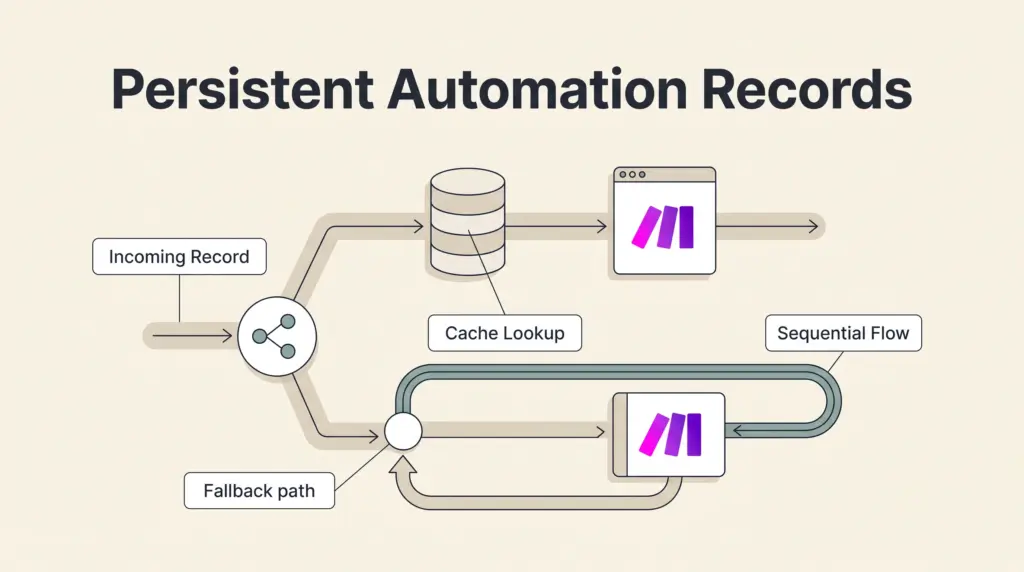
When combined with Make routers and filters, scenarios can check whether a record key exists in storage. If the Data Store module returns empty results, the router sends the payload down the creation route and commits the new key to storage. If the record already exists, the router either halts execution or diverts the payload into an update branch.
Note that Make routes evaluate sequentially rather than in parallel. If an early route writes an update to a Data Store, subsequent routes within that same scenario execution can immediately read that updated state, maintaining consistency across branched flows.
Execution Limits and Subscription Constraints
When incorporating persistent storage into scenario architectures, teams must account for account-level operational ceilings:
- Operation and Credit Consumption: Interacting with a Data Store—whether searching, reading, adding, or deleting a record—consumes standard workflow credits like other native modules. Learn more about platform allocations in our guide to Make pricing and credit usage.
- Execution Durations: Free tiers cap individual scenario run times at 5 minutes, while paid tiers allow up to 40 minutes. Large batch operations that iterate over thousands of Data Store records must stay within these temporal runtime boundaries.
- Data Transfer and Payload Size: Data transferred across modules scales with subscription tiers (starting with a 512 MB transfer cap on Free and 5 GB per 10,000 monthly credits on paid tiers, with maximum individual automated file sizes ranging from 5 MB to 1,000 MB depending on plan level). Keeping stored payloads clean and lean prevents reaching account data ceilings.
- Concurrency: High-frequency webhooks running concurrently can encounter race conditions if multiple runs attempt to write or update the same key simultaneously. When strict transaction locking is required, external SQL databases with ACID guarantees are safer.
Limitations of Make Data Stores
While convenient, internal Data Stores have clear boundaries that teams should recognize before committing large datasets:
- No Complex Relational Joins: Data Stores do not support SQL joins, foreign key enforcement, or cascading deletes. Complex entity relationships become unwieldy to maintain across multiple tables.
- No Native Spreadsheets UI for Non-Technical Users: While Make provides an administrative interface to view and edit records manually, it is not designed as a collaborative workspace for non-technical team members in the way Airtable or Google Sheets is.
- Platform Lock-In: Data kept exclusively in native Data Stores requires scenario-based exports or Make API extraction to migrate elsewhere.
- Error Resilience: If an automation halts unexpectedly midway through a sequence of writes, rolling back state requires explicit configuration. Review Make error handling and recovery workflows to build robust failure routes around storage updates.
Who Should Use Make Data Stores?
- Solo Freelancers: Ideal for independent builders who need a fast, zero-maintenance cache to eliminate redundant webhooks, store authentication tokens, or log execution timestamps without paying for separate database hosting.
- Lean Operations Teams: Best for teams running multi-app synchronization pipelines who want to reduce external API queries by retaining cross-platform ID lookup tables natively inside Make.
- Teams Managing Strict Quotas: Helpful for keeping track of daily usage, API budget caps, and deduplication records inside automations to prevent overshooting external platform allowances.
- When to Avoid: Teams requiring direct customer-facing database access, human data entry workflows, complex reporting dashboards, or enterprise audit compliance should route persistent data to a dedicated PostgreSQL, Supabase, or cloud database instance instead.
Next Steps
To implement Data Stores effectively, begin by assessing your workflow’s state persistence needs. Map out the exact fields required—such as external entity IDs, sync dates, and status codes—and establish unique data structures before building scenarios. For workflows handling sensitive operations, test fallback routes and error handlers to ensure failed executions do not leave Data Store records in an inconsistent state.
Sources and further reading
Research checked 2026-10-05. Product details can change.