

At a glance
NordVPN Meshnet suits solo freelancers, remote contractors, and informal micro-teams who need direct, encrypted peer-to-peer links between their own hardware. It is ideal for accessing home workstations while traveling, sharing large development assets directly between machines, or routing traffic through a trusted residential IP. However, formal teams needing centralized employee access controls or enterprise user directory integration should look toward dedicated corporate networking tools like NordLayer instead.
In this guide
What Is NordVPN Meshnet and How Does It Function?
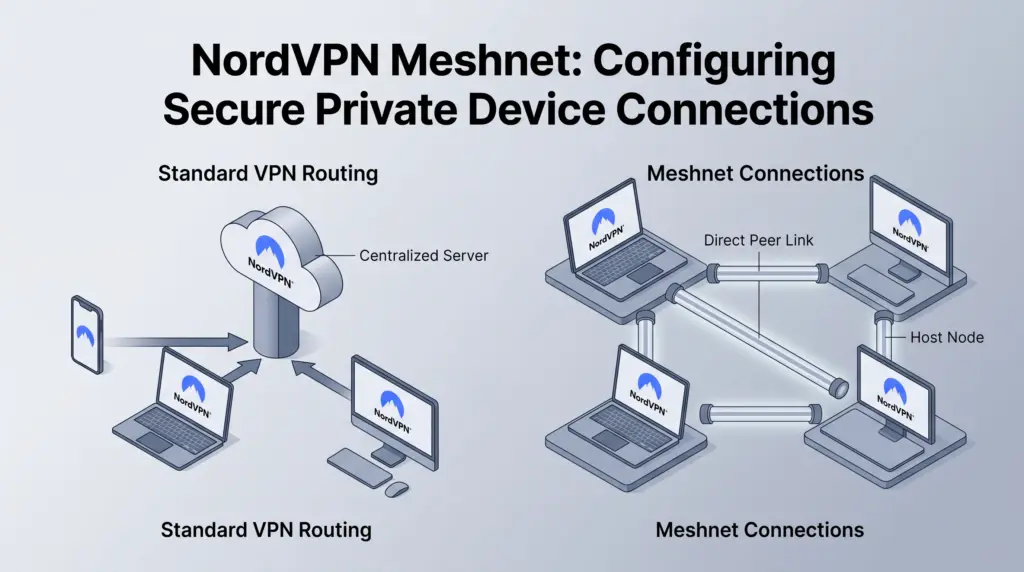
Standard virtual private networks work by routing all outbound device traffic through a centralized, remote server operated by the VPN provider. While this shields your real IP address from public web hosts and encrypts your connection on public networks, it does not allow your devices to talk directly to one another. NordVPN Meshnet changes this architecture by transforming connected devices into a decentralized, encrypted local area network (LAN) over the internet.
Instead of bouncing traffic off a commercial VPN hub in a distant city, Meshnet establishes direct, encrypted point-to-point tunnels between authenticated machines. Every device linked to your Meshnet receives a unique, private IP address and a dedicated host name. This structure enables two distinct modes of operation:
- Direct Device Interconnection: Connect directly to services hosted on another linked device—such as a local web server, remote desktop protocol (RDP), or secure shell (SSH) session—without opening port-forwarding rules on your home or office router.
- Traffic Routing via Peer Devices: Route your laptop or mobile web traffic through another connected desktop or home server. To outside websites, your connection appears to originate from that remote peer device rather than the local coffee shop or hotel Wi-Fi you are physically using.
For mobile professionals who frequently navigate unsecure networks, pairing Meshnet with broader privacy protections ensures baseline defense. You can read more about remote habits in our guide to NordVPN for remote work.
Core Use Cases for Freelancers and Lean Workflows
Setting up Meshnet provides immediate utility for independent digital workers who operate multiple computers or coordinate with trusted collaborators across locations.
Remote Workstation Access
Freelancers who maintain a high-powered desktop workstation at home while traveling with an ultrabook often face friction accessing local drives or rendering power. Meshnet lets you connect an ultrabook to the home desktop via native remote desktop tools or network file shares over an encrypted tunnel. Because connection routing occurs across NordVPN’s secure architecture, you bypass the security vulnerabilities associated with exposing standard RDP ports to the public web.
Direct File Transfers
Transferring multi-gigabyte video projects, design packages, or database dumps usually requires uploading assets to a third-party cloud storage service, waiting for synchronization, and having the recipient download them. Meshnet allows direct device-to-device transfers. Files travel directly through the point-to-point encrypted channel without consuming intermediate cloud storage space or subjecting unreleased assets to external vendor storage policies.
Local Staging and Development Testing
Web developers and software engineers frequently run staging environments on local ports (such as localhost:3000). Sharing these active staging builds with a remote contractor or client normally requires deploying temporary tunneling tools or provisioning remote staging servers. With Meshnet, you can invite a collaborator’s authenticated device to access your development port directly using your private Meshnet IP address.
Is Meshnet free, and how many devices can it connect?
Meshnet is free; a paid NordVPN subscription is not required for Meshnet itself. NordVPN’s Meshnet page distinguishes the free peer-network service from its optional paid VPN plans.
The Meshnet documentation lists up to 10 devices you own and 50 external devices. That is a different limit from simultaneous connections to NordVPN’s commercial VPN servers.
For example, a home workstation and travel laptop use two of your own-device slots. A collaborator’s invited computer counts as an external device. Decide which connections and permissions you need before inviting anyone.
If you also want a commercial VPN subscription, compare the separate NordVPN plans. Buying a paid tier is not the first step for a Meshnet-only setup.
Meshnet vs. Standard VPN vs. Business Gateways
To choose the right connection model for your operations, review how Meshnet compares against standard VPN tunnels and corporate business solutions.
| Capability | Standard NordVPN Connection | NordVPN Meshnet | NordLayer (Business VPN) |
|---|---|---|---|
| Connection Target | NordVPN public relay servers (225+ locations) | Specific peer devices (desktop, laptop, phone) | Dedicated organizational gateways and private servers |
| IP Identity | Shared or optional Dedicated IP add-on | IP address of the host peer device | Fixed dedicated business company IP |
| Direct File Sharing | No (routes web traffic only) | Yes (encrypted point-to-point file transfer) | Managed via corporate network access rules |
| Access Management | Individual user credentials | Device-level pairing invitations | Centralized admin console with SSO/provisioning |
| Device Limit Model | 10 devices per personal account | Up to 10 own devices and 50 external devices | Per-seat corporate licensing |
| Best Suited For | General browsing privacy, public Wi-Fi defense | Freelancers, solo builders, home-to-remote links | Scaling businesses, regulated teams, staff control |
Technical Limitations to Evaluate
While Meshnet simplifies peer networking, it is built on consumer-oriented software and involves specific operational trade-offs:
- Host Device Dependency: If you plan to route your traffic through a home computer or access a local drive while traveling, that host machine must remain powered on, awake, and connected to an active internet line. Power outages or OS sleep settings will sever the connection entirely.
- Upstream Bandwidth Bottlenecks: When routing traffic through a peer device or pulling files remotely, the host network’s upload speed can limit transfers, alongside the other connection and device constraints. If your home office internet has a slow asymmetric upload rate, remote browsing performance will degrade regardless of your travel connection speed.
- Access boundaries: Review permissions for each linked device. Meshnet’s device allowance should not be treated as a substitute for a company identity and access-management system.
Who Should Use Meshnet vs. Alternatives?
Meshnet is the optimal choice for:
- Solo professionals managing multiple laptops, home servers, or mobile devices who need seamless file transfers without third-party cloud uploads.
- Developers who want to demonstrate local ports or staging apps directly to external contractors without configuring complex firewall rules.
- Remote workers who require a consistent residential IP address by routing foreign traffic through their primary home desktop.
Alternative tools are better for:
- Companies with multiple employees requiring centralized access administration, unified billing, and compliance auditing. These teams should evaluate dedicated platforms like NordLayer.
- Users who simply want a VPN connection for internet browsing on public networks without inter-device communication, where standard NordVPN server connections on the Basic tier are sufficient.
Next Steps for Deployment
- Audit Your Hardware: Identify the target host device (such as an office desktop or media server) and configure its power settings to disable system sleep during idle periods.
- Start with free Meshnet: Use the official Meshnet download instructions. Consider a separate paid VPN only if you also need access to commercial VPN servers.
- Install and Link Clients: Download the NordVPN client across your primary desktop (Windows, macOS, or Linux) and secondary mobile devices (Android or iOS).
- Enable Meshnet: Toggle the Meshnet feature within the client interface on each machine, copy the assigned internal IP or device name, and establish permissions for remote access or traffic routing.
Sources and further reading
Official Meshnet overview · Meshnet device limits
Meshnet cost and device-limit sections corrected 2026-10-14. Other sections researched 2026-10-05. Product details can change.